Protected Input (Pro)
Auto clickers and macros press a button faster than a person can. That matters in clicker games, rhythm games, weapons, and fast menus. ProtectedInput replaces the Input System "pressed this frame" calls. Each input is limited on its own, so an auto clicker gains nothing.
Walkthrough: Protecting against auto clickers.
Note
Install the Input System package (com.unity.inputsystem, version 1.1 or newer). In Edit > Project Settings > Player, set Active Input Handling to Input System Package (New) or Both. Without that, this code is not compiled.
How to use
Replace your
Keyboard.current[key].wasPressedThisFrameMouse.current.leftButton.wasPressedThisFrameGamepad.current.buttonSouth.wasPressedThisFrameInputAction.WasPressedThisFrame()
calls with the static GUPS.AntiCheat.Protected.Input.ProtectedInput class:
// Replace your Input System "pressed this frame" queries with GUPS.AntiCheat.Protected.Input.ProtectedInput.
public static class ProtectedInput
{
    // The presses per second allowed per input (from the InputCheatingDetector, default 10).
    public static uint MaxPressesPerSecond { get; }

    // The minimum interval in seconds between two guarded presses of the same input (1 / MaxPressesPerSecond).
    public static double MinPressInterval { get; }

    // Whether an InputCheatingDetector with an InputMonitor drives the guards.
    public static bool IsMonitored { get; }

    // Guarded "pressed this frame" queries - rate limited per input and device.
    // The device parameter is optional: null addresses the current device of the type (Keyboard.current, ...).
    public static bool GetDown(InputId _Input);
    public static bool GetKeyDown(Key _Key, Keyboard _Keyboard = null);
    public static bool GetMouseButtonDown(MouseButton _Button, Mouse _Mouse = null);
    public static bool GetMouseButtonDown(int _Button, Mouse _Mouse = null);       // Index following MouseButton (0 = left, 1 = right, 2 = middle, 3 = forward, 4 = back).
    public static bool GetGamepadButtonDown(GamepadButton _Button, Gamepad _Gamepad = null);
    public static bool GetTouchDown(int _TouchIndex = 0, Touchscreen _Touchscreen = null);
    public static bool WasPressedThisFrame(InputAction _Action);

    // Guarded replacement for "action.performed += callback" - rate limited, dispose the handle to unsubscribe.
    public static IDisposable OnPerformed(InputAction _Action, Action<InputAction> _Callback);

    // Hold queries - plain pass-throughs, not rate limited.
    public static bool IsPressed(InputId _Input);
    public static bool GetKey(Key _Key, Keyboard _Keyboard = null);
    public static bool GetMouseButton(MouseButton _Button, Mouse _Mouse = null);
    public static bool GetMouseButton(int _Button, Mouse _Mouse = null);
    public static bool GetGamepadButton(GamepadButton _Button, Gamepad _Gamepad = null);
    public static bool GetTouch(int _TouchIndex = 0, Touchscreen _Touchscreen = null);
    public static bool IsPressed(InputAction _Action);

    // Introspection.
    public static bool IsPending(InputId _Input);
    public static double GetRemainingCooldown(InputId _Input);
    public static int GetPressCount(InputId _Input);
    public static int GetPeakPressesPerSecond(InputId _Input);
    public static bool IsFlaggedAsCheating(InputId _Input);

    // Forgets all guards and pending presses.
    public static void Reset();
}
A minimal example:
using GUPS.AntiCheat.Protected.Input;
using UnityEngine;
using UnityEngine.InputSystem;
using UnityEngine.InputSystem.LowLevel;

public class Player : MonoBehaviour
{
    private void Update()
    {
        // Fires at most 10 times per second, no matter how fast the mouse is clicked.
        if (ProtectedInput.GetMouseButtonDown(MouseButton.Left))
        {
            this.Shoot();
        }
    }

    private void FixedUpdate()
    {
        // Safe in the fixed loop as well: exactly one fixed step sees the press.
        if (ProtectedInput.GetKeyDown(Key.Space))
        {
            this.Jump();
        }
    }
}
Actions and action maps
Actions from an Input Actions asset are limited the same way, however you read them. That includes InputSystem_Actions, PlayerInput, and your own action maps.
Polling - pass the action instead of polling it yourself:
// Instead of: if (this.attackAction.WasPressedThisFrame())
if (ProtectedInput.WasPressedThisFrame(this.attackAction))
{
    this.Attack();
}
Callbacks (performed). Most action code uses the performed event. Replace that subscription with ProtectedInput.OnPerformed. The callback then runs at most MaxPressesPerSecond times a second. An early press is kept by default. It is delivered after the wait, on the next input update. That matches a polled press. If KeepEarlyPresses is false, the early press is dropped instead. See below.
using System;
using GUPS.AntiCheat.Protected.Input;
using UnityEngine;
using UnityEngine.InputSystem;

public class Player : MonoBehaviour
{
    private InputSystem_Actions actions;
    private IDisposable attackSubscription;

    private void Awake()
    {
        this.actions = new InputSystem_Actions();
    }

    private void OnEnable()
    {
        this.actions.Player.Enable();

        // Instead of: this.actions.Player.Attack.performed += _ => this.Attack();
        this.attackSubscription = ProtectedInput.OnPerformed(this.actions.Player.Attack, _ => this.Attack());
    }

    private void OnDisable()
    {
        this.attackSubscription?.Dispose();
        this.actions.Player.Disable();
    }
}
With a PlayerInput component, subscribe the same way: ProtectedInput.OnPerformed(this.playerInput.actions["Attack"], ...). Leave Behavior on Invoke C Sharp Events, or use the subscription instead of the Unity event. A polled read and a callback on the same action share one limit.
Button actions on every enabled action map are sent to the InputMonitor when they perform. They are checked even if your code does not use ProtectedInput. Value actions and pass-through actions are not counted as presses. A Vector2 Move action changes all the time. Limit the real buttons behind it if you need to.
Devices and local multiplayer
Each input is limited per device. The left button of two mice is two inputs. The south button of two gamepads is two inputs. Calls without a device use the current device (Keyboard.current, Mouse.current, Gamepad.current, Touchscreen.current). That is the device that last sent input. A one-player game wants that. For local multiplayer, pass the player's device:
using GUPS.AntiCheat.Protected.Input;
using UnityEngine;
using UnityEngine.InputSystem;
using UnityEngine.InputSystem.LowLevel;

public class CoopPlayer : MonoBehaviour
{
    public Gamepad Gamepad; // e.g. from PlayerInput.devices or Gamepad.all[index]

    private void Update()
    {
        // Player two is never throttled by player one.
        if (ProtectedInput.GetGamepadButtonDown(GamepadButton.South, this.Gamepad))
        {
            this.Attack();
        }
    }
}
Actions are limited per action instance. PlayerInput gives each extra player its own copy of the actions. ProtectedInput.WasPressedThisFrame(playerInput.actions["Attack"]) is then a separate input for each player. The device id is part of the InputId. Logs show it as Gamepad/South#17. The monitor and detector report that same id.
Rate limiting
Each input is limited on its own device. It fires at most MaxPressesPerSecond times a second. The default is 10. Set that on the Input Cheating Detector.
- At 10 presses a second, an input fires at most every 100 ms.
- An early press is kept by default. It fires in the first
UpdateorFixedUpdateafter the wait. If you press again after 50 ms, the call returns true 50 ms later. - While one press is waiting, extra presses fold into it. An auto clicker at 100 clicks a second becomes 10 guarded clicks. A person who is only a little fast loses only the extra presses.
- To drop early presses, set the constant
ProtectedInput.KeepEarlyPressesinSource/Protected/Input/ProtectedInput.cstofalse. That is source, not an Inspector field.IsPendingis then never true. Use this when a late press is worse than a lost one, such as in a rhythm game. - Fired presses use the allowed time grid, not the frame that delivered them. The rate stays at
MaxPressesPerSecondno matter the frame rate. - Presses that piled up while nothing asked for them are thrown away. An old click cannot fire much later, for example after a script was disabled.
Update and FixedUpdate
All ...Down calls work from Update, LateUpdate, and FixedUpdate.
- In Update, a guarded press is true for the whole frame it fired in. That matches
Input.GetKeyDown. - In FixedUpdate, a guarded press is true for exactly one physics step. That is the first step that asks for it. It still works if a frame has no physics step, or several. Physics code does not miss the press, and it does not see it twice.
Keys, buttons and actions
Keyboard keys use the Input System Key enum. Mouse buttons use MouseButton in UnityEngine.InputSystem.LowLevel: Left, Right, Middle, Forward, Back. An int overload uses the same order. Gamepad buttons use GamepadButton. Aliases such as South, A, and Cross share one limit.
If you are moving from UnityEngine.Input, replace KeyCode with Key. KeyCode.Space becomes Key.Space. KeyCode.LeftControl becomes Key.LeftCtrl. KeyCode.Alpha1 becomes Key.Digit1. Old joystick key codes have no match. Use GetGamepadButtonDown(GamepadButton) instead.
Physical keys, mouse buttons, gamepad buttons, and touches are read from Input System events. They keep the time the event was created. Button actions are counted when they perform. See Actions and action maps. An action has its own limit, separate from the button it is bound to. WasPressedThisFrame(attackAction) and GetMouseButtonDown(MouseButton.Left) do not share a limit, even if Attack is bound to the left mouse button.
Monitor and detector
ProtectedInput reads the allowed rate and the press history from the InputMonitor and the InputCheatingDetector. Add the Input Cheating Detector prefab as a child of the AntiCheat-Monitor. The Anti Cheat Monitor prefab already includes it.
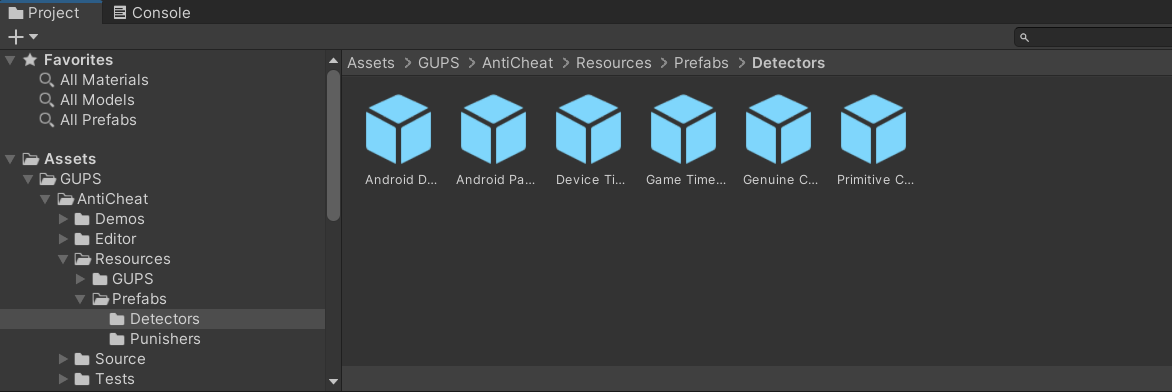
Drag and drop the prefab onto the AntiCheat monitor in your scene.
Without the detector, ProtectedInput still limits each input to 10 presses a second. It uses its own tracker. No cheat is reported. A warning is logged once.
Custom Observer
If you would like to write a custom listener for the detector, you can attach an observer:
// Get the detector from the AntiCheat monitor.
var detector = AntiCheatMonitor.Instance
      .GetDetector<InputCheatingDetector>();

// Subscribe as observer and get notified on inhuman input rates.
detector.Subscribe(myObserver);