Punishing cheaters
Goal: You will learn how to decide what happens when cheating is detected, from built-in punishments to quietly collecting evidence for a later review.
The problem
You already know cheating can be detected (see Reacting to cheating). The remaining question is what should happen next. You need an automatic consequence when the threat score is high enough — without punishing innocent players because of a single false positive.
The solution
Attach punishers as children of the AntiCheat-Monitor. Each punisher waits for a threat-score threshold, then runs its Punish() method. Use built-in punishers for quick reactions, or implement IPunisher for your own behavior (including silent logging for manual review).
Step 1: Choose a strategy
A punisher is a MonoBehaviour that you attach as a child of the AntiCheat-Monitor. Each punisher has a ThreatRating, which is the threshold it waits for. When the monitor's overall threat score reaches that value, the monitor calls the punisher's Punish() method, and the punishment runs.
Every punisher exposes a few key properties:
- Is Active: Whether the punisher is enabled.
- Threat Rating: The threshold at which the punisher fires. A higher value means the system must be more certain before it acts.
- Punish Once: Whether the punisher fires only once, or every time the threshold is exceeded.
- Has Punished: Whether it has already administered its punishment.
Before you reach for the most drastic reaction, decide your strategy.
Direct punishment reacts immediately. It is satisfying, and it discourages cheaters from trying again. The downside is that no detection system is perfect. Acting too quickly risks punishing an innocent player because of a false positive, which can easily backfire in the form of bad reviews and support tickets.
AntiCheat already softens this risk: every detection carries a false-positive likelihood, detections are accumulated with a sensitivity factor, and the threat score slowly decays over time. This means a single small blip does not immediately trigger a drastic reaction. Still, the threat score is a probability, not proof.
Collecting information is often safer, especially before a ban. Log the detection, on the device or on your server, and review it later.
A soft limit can be better than a hard ban. For example, match suspected cheaters only with each other, or quietly cut their rewards. That does not tell the cheater they were caught.
A simple rule of thumb:
- Low thresholds: use gentle or annoying reactions (flip the camera, reduce the FPS) or silent logging.
- High thresholds: reserve drastic reactions (exiting the game) for cases the system is very confident about.
- Bans: prefer manual review before you hand out permanent bans.
Step 2: Add a built-in punisher
The built-in punisher prefabs live at Assets/GUPS/AntiCheat/Resources/Prefabs/Punishers. To use one, drag it onto the AntiCheat-Monitor so it becomes a child of it. It then registers itself automatically.
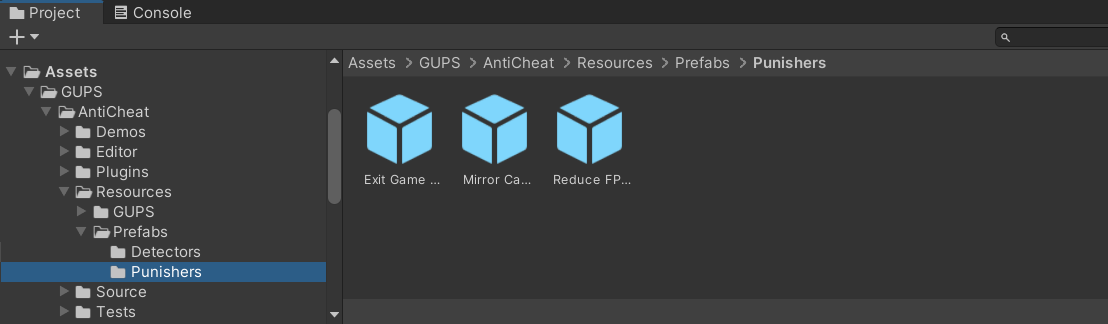
Image 1: Here you see the built-in Punisher prefabs, located in Assets/GUPS/AntiCheat/Resources/Prefabs/Punishers.
AntiCheat ships with three universal punishers, each with a sensible default threshold:
- Flip / Mirror Camera (Threat Rating 450): Flips the camera view horizontally or vertically. Annoying rather than harmful, and especially effective in first-person games.
- Reduce FPS (Threat Rating 550): Lowers the maximum frame rate to a low value, which is frustrating for a cheater but not destructive.
- Exit Game (Threat Rating 850): A drastic reaction that closes the application. Because it is so severe, its threshold is set high.
All three fire only once (Punish Once is enabled), so they will not repeatedly trigger during a single session.

Image 2: Here you see the Exit Game Punisher inspector, set to trigger once the threat level reaches 850.
Step 3: Tune the Threat Rating
In the inspector you can adjust two important fields: Is Active, to enable or disable the punisher, and Threat Rating, which is the threshold at which Punish() runs.
Raise the threshold if you want fewer, more confident punishments. Lower it if you want an earlier soft reaction. Match soft punishers to lower scores and drastic ones to higher scores.
Step 4: Write your own reaction (optional)
Sometimes the built-in punishers are not enough, and you want your own behavior. There are two common approaches.
Custom punisher (automatic): Implement the IPunisher interface on a MonoBehaviour and attach it as a child of the AntiCheat-Monitor. It then fires automatically as soon as the threat score reaches its ThreatRating.
using GUPS.AntiCheat.Core.Punisher;
using UnityEngine;

public class LogPunisher : MonoBehaviour, IPunisher
{
    public string Name => "Log Punisher";
    public bool IsSupported => true;
    public bool IsActive => true;
    public uint ThreatRating => 300;   // fires early, as a soft reaction
    public bool PunishOnce => true;
    public bool HasPunished { get; private set; }

    public void Punish()
    {
        HasPunished = true;
        Debug.LogWarning("Possible cheating - flagging this session for manual review.");
        // e.g. send a report to your server here.
    }
}
Observer instead (full control, softer): If you would rather not tie your reaction to a threshold at all, you can subscribe an observer to a detector, as shown in the Reacting to cheating guide, and simply record the event for later manual review.
The result
Once a punisher is attached and configured:
- When the overall threat score reaches its Threat Rating,
Punish()runs. - Built-in options can flip the camera, reduce FPS, or exit the game — each at a different confidence level.
- A custom
IPunishercan silently flag the session for review instead of punishing in-game.
You decide how harsh the consequence is, and how sure the system must be before it acts.
Next steps
- Punisher — the built-in punishers and how the threat score works.
- Reacting to cheating — log detections for manual review instead of (or before) punishing.
- Guides — pick another protection scenario (memory, saved data, speedhacks, device clock).