Protecting against speedhacks
Goal: You will learn how to stop players from speeding up or slowing down your game with tools like Cheat Engine Speedhack, and how to keep movement and timers trustworthy with ProtectedTime.
The problem
Not every cheat edits coins or health. Many players simply accelerate the whole game. Cheat Engine's Speedhack multiplies how fast time passes for your process. At a factor of 25, cooldowns finish instantly, movement becomes absurdly fast, and any logic that uses UnityEngine.Time.deltaTime is broken in the cheater's favor.
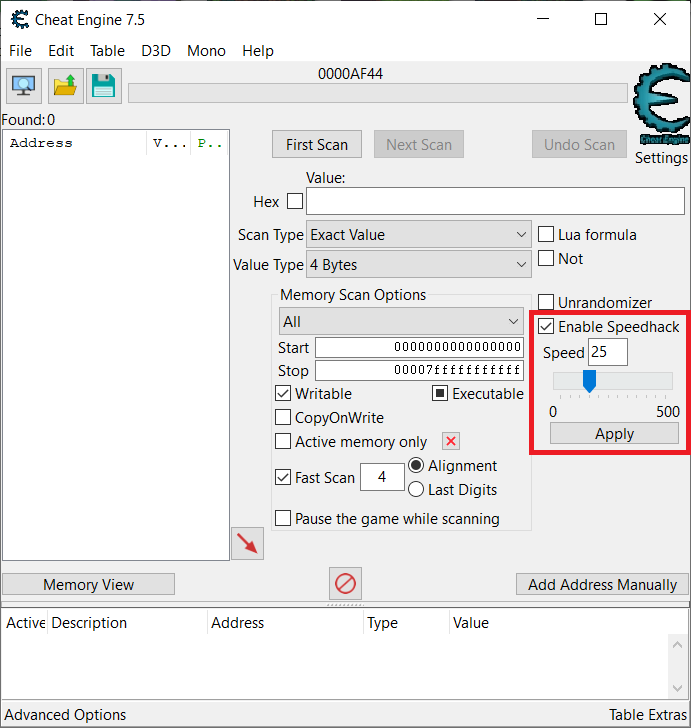
Image 1: Here you see Cheat Engine with Speedhack enabled and the speed set to 25 — twenty-five times normal game speed.
In the game, that looks like a player flying across the level far faster than intended.

Image 2: Here you see the result in-game: the player character races across platforms.
The solution
Use AntiCheat ProtectedTime instead of UnityEngine.Time for gameplay timing, and add the Game Time Cheating Detector (with its Game Time Monitor) so speedhacks are detected and ProtectedTime is corrected back to real speed.
A speed hack makes the clocks your game can read run too fast. AntiCheat compares Unity's clock with a real-time clock that the hack does not change as easily. When they disagree, protected time follows the real-time clock.
Step 1: Know what depends on game time
Anything driven by Time.deltaTime, Time.time, or similar APIs is affected by a speedhack. Typical targets:
- Movement and animation: Walk, run, jump, and projectile speeds become unfair.
- Cooldowns and skill timers: Abilities recharge in a fraction of a second.
- Spawning and waves: Enemies or resources appear much too early.
- Match or level timers: The cheater finishes content faster than honest players.
You do not need to replace every use of Time in the project, but you should protect the timing that decides fairness.
Step 2: Replace UnityEngine.Time with ProtectedTime
ProtectedTime mirrors the common Unity Time properties. In your gameplay code, switch the namespace and type so movement and timers read the protected clock.
Here is a simple mover before AntiCheat:
using UnityEngine;

public class PlayerMover : MonoBehaviour
{
    public float speed = 5f;

    private void Update()
    {
        // Driven by Unity's clock — easy to accelerate with Speedhack.
        transform.Translate(Vector3.right * speed * Time.deltaTime);
    }
}
And here is the same script after:
using UnityEngine;
using GUPS.AntiCheat.Protected.Time;

public class PlayerMover : MonoBehaviour
{
    public float speed = 5f;

    private void Update()
    {
        // Same API shape, but uses ProtectedTime.
        transform.Translate(Vector3.right * speed * ProtectedTime.deltaTime);
    }
}
ProtectedTime exposes the properties you typically need, including deltaTime, fixedDeltaTime, time, timeScale, unscaledDeltaTime, unscaledTime, realtimeSinceStartup, and timeSinceLevelLoad.
For the full API and detector details, see Protected Game Time and Game Time Detector.
Step 3: Add the Game Time Cheating Detector
The Game Time Cheating Detector listens to the Game Time Monitor. From the first bad report, ProtectedTime follows real time, so movement and timers do not jump ahead. A warning waits until about 2.5 seconds of reports agree. When the clock looks normal again, the warning clears.
You can find the prepared prefab (detector + monitor together) at Assets/GUPS/AntiCheat/Resources/Prefabs/Detectors.
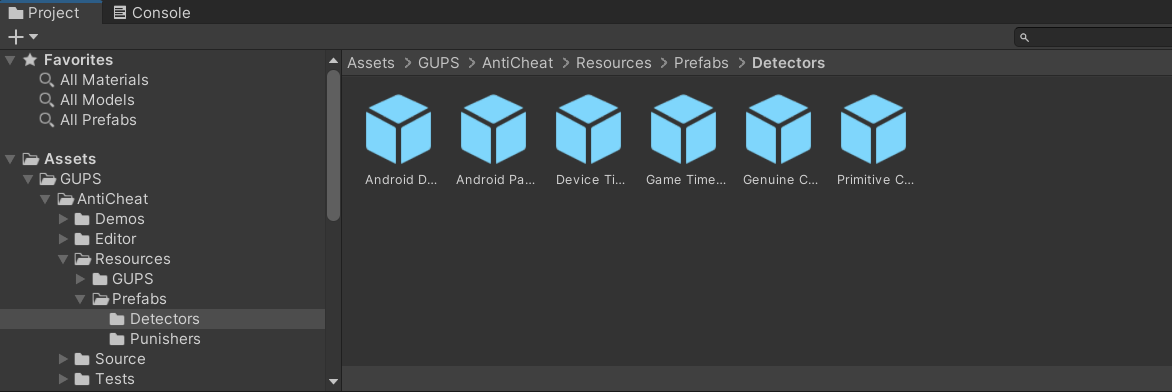
Image 3: Here you see the detector prefabs. Drag the "Game Time Cheating Detector" prefab onto your AntiCheat-Monitor so it becomes a child of it.
The monitor and detector must live on the same GameObject. The prefab already sets this up for you.
Step 4: Configure the detector
Once added, configure the detector in the inspector.
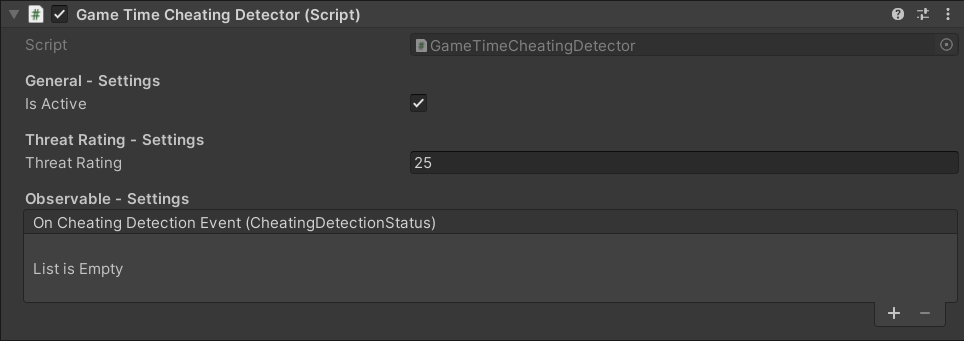
Image 4: Here you see the inspector settings of the Game Time Cheating Detector.
Important settings:
- Is Active: Enables or disables the detector.
- Threat Rating: How much each detection adds to the AntiCheat-Monitor threat score. The default is low (25) because it is reported for every window (about 2.5 seconds) in which the hack is still active, so a persistent hack accumulates quickly.
- Detect Delta Time Cheating: Detects acceleration or slowdown of Unity's clock — the usual Speedhack case. Leave this enabled for this scenario.
- Detect Fixed Delta Time Cheating: Off by default. Turn it on if cheaters skip physics by changing
fixedDeltaTime. While it is on, change that value only throughProtectedTime.fixedDeltaTime. Any other value is treated as a cheat and put back. - On Cheating Detection Event: Wire inspector callbacks here if you want an immediate reaction without code.
If you prefer to react in code, subscribe as an observer:
using GUPS.AntiCheat;
using GUPS.AntiCheat.Detector;

var detector = AntiCheatMonitor.Instance
    .GetDetector<GameTimeCheatingDetector>();

detector.Subscribe(myObserver);
The result
With ProtectedTime in your gameplay code and the Game Time Cheating Detector running:
- A Speedhack set to 25 no longer silently gives the player absurd movement and instant cooldowns on logic that uses
ProtectedTime. - The detector reports the cheat about every 2.5 seconds while the hack stays on.
ProtectedTimestays at real speed while the hack is on, and does not jump when the hack changes or turns off.- Changing
Time.timeScaleis not treated as cheating; that remains a legitimate engine feature in this version.
You can still react further — log the attempt, warn the player, or let a punisher fire — using the same patterns as in the reacting and punishing guides.
Next steps
- Protecting against device clock cheating — if players change the system date to skip timers or trials instead.
- Reacting to detected cheating — hook inspector events or observers when speedhacking is detected.
- Protected Game Time — full
ProtectedTimeAPI. - Game Time Detector — monitor, detector settings, and lifecycle details.