Protecting against device clock cheating
Goal: You will learn how to stop players from skipping timers, trials, or daily rewards by changing the device date and time, and how to use a trustworthy UTC clock with ProtectedTime.
The problem
Many games trust the player's device clock for energy refill, daily login rewards, event end dates, or trial periods. That clock is under the player's control. A cheater can open the system date and time settings, jump hours or days ahead (or rewind), then return to the game — and suddenly cooldowns are over, the trial never expires, or tomorrow's reward is available now.
This is different from a Speedhack (which accelerates the running process). Here the player changes the wall-clock / system date on the device itself.
The solution
Use AntiCheat ProtectedTime.UtcNow instead of DateTime.UtcNow for anything that decides fairness over real calendar time, and add the Device Time Cheating Detector (with its Device Time Monitor) so clock jumps are detected. Prefer internet time as the reference so the protected UTC value does not depend on a clock the player can edit.
Step 1: Know what depends on the device clock
Anything that asks “what time is it in the real world?” is at risk if it uses DateTime.Now / DateTime.UtcNow alone:
- Energy / stamina timers: Jump the clock forward to refill instantly.
- Daily and weekly rewards: Claim the same reward many times by advancing the date.
- Trials and subscriptions: Rewind or freeze the clock so a trial never ends.
- Timed events and shops: Unlock future content early by setting the date ahead.
Protect the places where calendar time grants an advantage — not every debug log timestamp.
Step 2: Replace DateTime.UtcNow with ProtectedTime.UtcNow
ProtectedTime.UtcNow is a calculated UTC time meant to stay trustworthy. Use it wherever you currently call DateTime.UtcNow for gameplay or monetization logic.
Here is a simple energy timer before AntiCheat:
using System;
using UnityEngine;

public class EnergyTimer : MonoBehaviour
{
    private DateTime nextRefillUtc;

    public bool CanRefill()
    {
        // Easy to cheat: change the device clock and this becomes true.
        return DateTime.UtcNow >= nextRefillUtc;
    }
}
And here is the same check after:
using System;
using GUPS.AntiCheat.Protected.Time;
using UnityEngine;

public class EnergyTimer : MonoBehaviour
{
    private DateTime nextRefillUtc;

    public bool CanRefill()
    {
        // Uses the protected UTC clock from AntiCheat.
        return ProtectedTime.UtcNow >= nextRefillUtc;
    }
}
For the full API overview, see Protected Device Time.
Step 3: Add the Device Time Cheating Detector
The Device Time Cheating Detector listens to the Device Time Monitor. When the app resumes, it compares the device clock with the time that really passed. A large jump is reported. It also checks once at startup if the clock is already more than 15 seconds off.
You can find the prepared prefab (detector + monitor together) at Assets/GUPS/AntiCheat/Resources/Prefabs/Detectors.
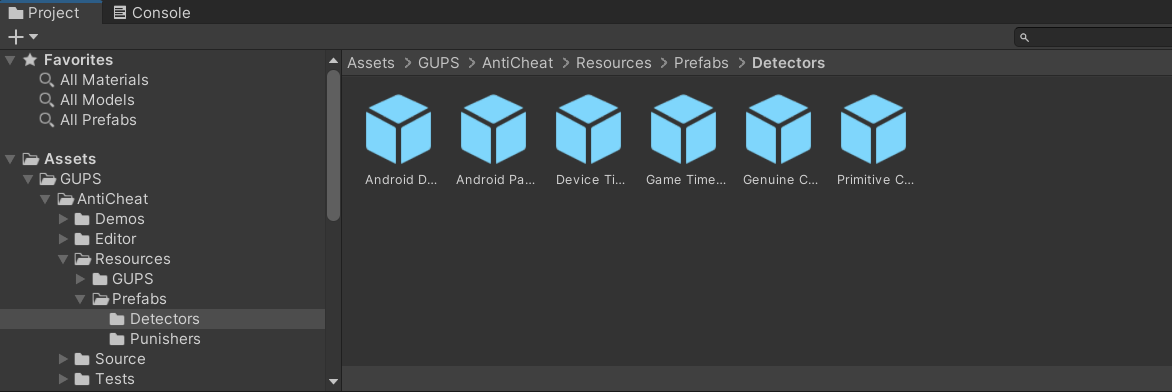
Image 1: Here you see the detector prefabs. Drag the "Device Time Cheating Detector" prefab onto your AntiCheat-Monitor so it becomes a child of it.
The monitor and detector must live on the same GameObject. The prefab already sets this up for you.
Step 4: Configure internet time and the detector
Once added, configure the detector in the inspector.
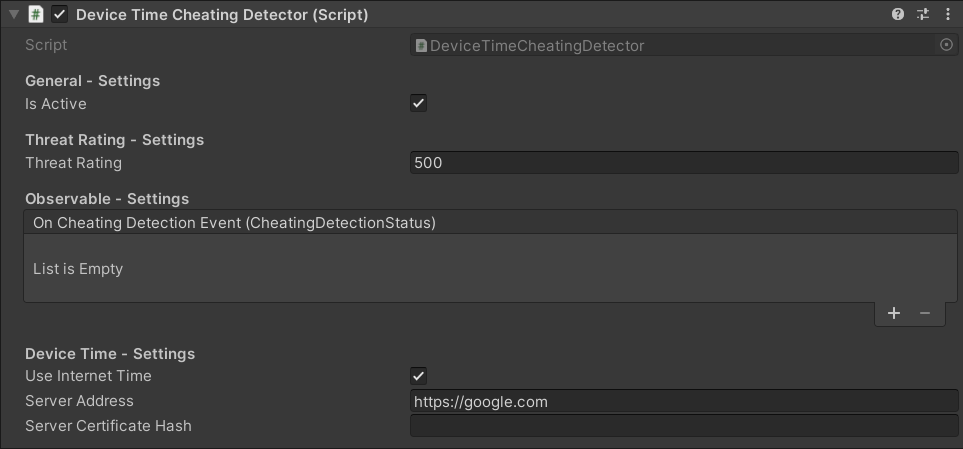
Image 2: Here you see the inspector settings of the Device Time Cheating Detector.
Important settings:
- Is Active: Enables or disables the detector.
- Threat Rating: How much each detection adds to the AntiCheat-Monitor threat score. The default is high (500), because clock manipulation is unlikely to be a false positive and the impact is significant.
- Use Internet Time: When enabled (default), the application start time is fetched from an internet endpoint instead of trusting the device clock. Leave this on for the strongest protection.
- Server Address: The server used to read the current UTC time from the response
Dateheader (defaulthttps://google.com). The device needs network access to that host. - Server Certificate Hash: Optional. When set, a certificate mismatch is treated as possible tampering.
- On Cheating Detection Event: Wire inspector callbacks here if you want an immediate reaction without code.
The monitor also has a Tolerance (seconds). Small differences on resume are ignored so normal OS delays are not treated as cheating.
If you prefer to react in code, subscribe as an observer:
using GUPS.AntiCheat;
using GUPS.AntiCheat.Detector;

var detector = AntiCheatMonitor.Instance
    .GetDetector<DeviceTimeCheatingDetector>();

detector.Subscribe(myObserver);
The result
With ProtectedTime.UtcNow in your timer logic and the Device Time Cheating Detector running:
- Energy, daily rewards, and trials no longer blindly trust a clock the player can edit in the OS settings.
- Jumping the device date forward or back is noticed when the app resumes, and cheating is reported to the AntiCheat-Monitor.
- With Use Internet Time enabled,
ProtectedTime.UtcNowis anchored to a network time source, so protected calendar logic stays closer to real UTC even if the local clock is wrong.
You can still react further — refuse the reward, log the attempt, or let a punisher fire — using the same patterns as in the reacting and punishing guides.
Note
Client-side time protection raises the bar for casual cheaters. For high-value rewards (purchases, competitive seasons), also validate critical timers on a server when you can.
Next steps
- Reacting to detected cheating — hook inspector events or observers when clock cheating is detected.
- Protecting against speedhacks — if the cheat is accelerating the running game instead of changing the system date.
- Protected Device Time —
ProtectedTime.UtcNowoverview. - Device Time Detector — detector settings and lifecycle.