Protecting memory against Cheat Engine
Goal: You will learn how to secure your variables and properties against memory manipulation tools like Cheat Engine, and how to detect and react when someone tries to tamper with them.
The problem
When players try to cheat in a game, memory manipulation is one of the most common and easiest methods they use. Tools like Cheat Engine allow players to scan the game's memory while it is running, find important values (such as coins, health, or score), and change them to whatever they want.
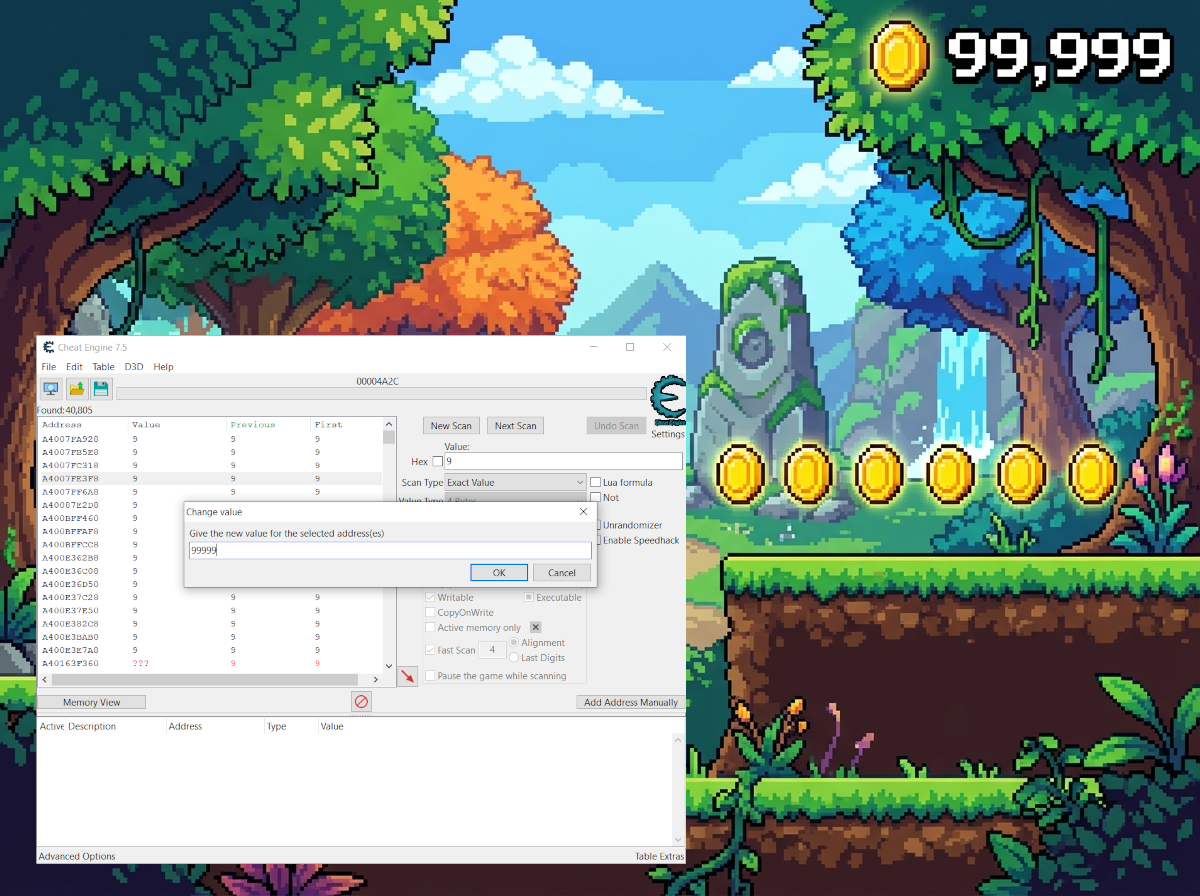
Image 1: Here you see Cheat Engine being used to find and change the number of coins in a game.
The solution
Use AntiCheat protected types (encrypted values plus honeypots) so Cheat Engine cannot reliably find or edit the real data, and add the Primitive Cheating Detector so tampering is reported to the AntiCheat-Monitor.
Step 1: Decide what to protect
You do not need to protect every value in your game. Focus on the variables that matter for the gameplay experience. Consider what would give a player an unfair advantage if it were changed:
- Player health: So players cannot make themselves invincible.
- Currencies (coins, gems): So players cannot give themselves unlimited money to buy items.
- Scores: So players cannot artificially boost their ranking on leaderboards.
- Ammunition or resources: So players cannot fire indefinitely without reloading.
Step 2: Replace plain types with protected types
Instead of regular, unprotected data types, use the protected versions provided by AntiCheat. These variables are encrypted in memory and continuously checked for unauthorized changes.
In addition to encrypting the real value, AntiCheat also stores fake values, called honeypots. When a cheater uses Cheat Engine to search for a value such as the coin amount, they are likely to find the honeypot instead of the real, encrypted value. As soon as they attempt to change the honeypot, AntiCheat registers the manipulation, which allows you to respond to it.
Here is an example of how a simple player score script looks before using AntiCheat:
using UnityEngine;

public class PlayerScore : MonoBehaviour
{
    // Plain int - stored in memory as-is, trivial to edit.
    private int coins = 0;

    public void AddCoins(int amount)
    {
        coins += amount; // unprotected
    }
}
And here is how it looks after adding AntiCheat:
using UnityEngine;
using GUPS.AntiCheat.Protected;

public class PlayerScore : MonoBehaviour
{
    // ProtectedInt32 - encrypted in memory and watched.
    private ProtectedInt32 protectedCoins = 0;

    public void AddProtectedCoins(int amount)
    {
        protectedCoins += amount; // same syntax
    }
}
The syntax remains the same. You can add, subtract, and read the values just like regular variables, but they are now protected against memory scanners.
For details on all available protected types, see the Protected Primitives documentation.
Step 3: Add the Primitive Cheating Detector
The protected variables secure the values themselves, but the actual detection is handled by the Primitive Cheating Detector. It is notified whenever a protected variable detects tampering, and it forwards this information to the AntiCheat-Monitor so you can react to it.
To enable detection, add the detector to your AntiCheat-Monitor. You can find the prepared prefab at Assets/GUPS/AntiCheat/Resources/Prefabs/Detectors.
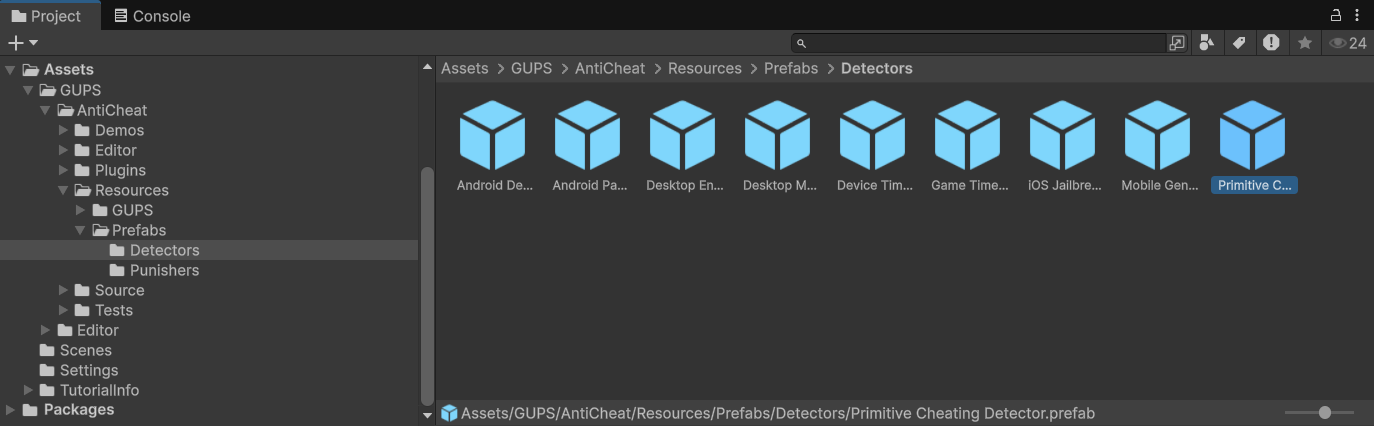
Image 2: Here you see the "Primitive Cheating Detector" prefab, located in Assets/GUPS/AntiCheat/Resources/Prefabs/Detectors next to the other detectors.
Drag the "Primitive Cheating Detector" prefab onto your AntiCheat-Monitor so it becomes a child of it. Once added, you can configure it in the inspector.
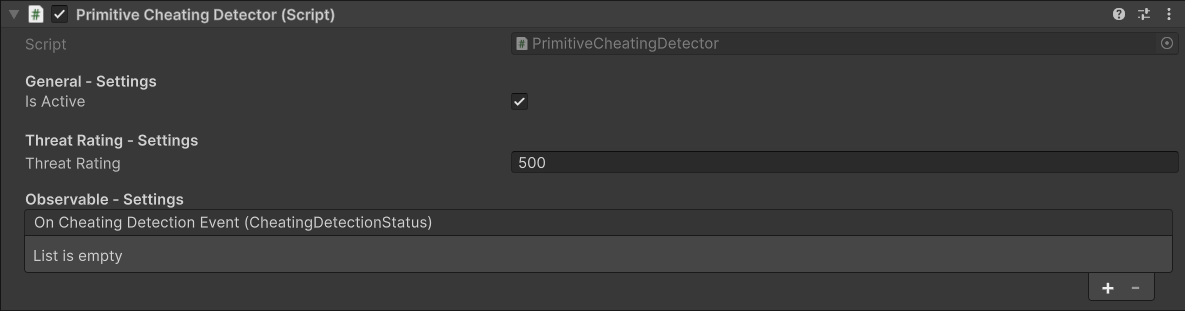
Image 3: Here you see the inspector view of the Primitive Cheating Detector.
Step 4: Configure detection and hook a reaction
The inspector provides the following settings:
- Is Active: Enables or disables the detector.
- Threat Rating: The value this detector contributes to the overall threat score of the AntiCheat-Monitor when it detects cheating (500 by default). A higher value means detected primitive tampering weighs more heavily.
- On Cheating Detection Event: A list of custom reactions that are invoked when cheating is detected. You can assign your own callbacks here directly in the inspector, without writing any code.
If you prefer to react in code, you can subscribe to the detector as an observer:
// Get the detector from the AntiCheat-Monitor.
var detector = AntiCheatMonitor.Instance
      .GetDetector<PrimitiveCheatingDetector>();

// Subscribe as observer and get notified when cheating is detected.
detector.Subscribe(myObserver);
The result
With protected variables and the Primitive Cheating Detector in place:
- The real coin, health, or score value is encrypted in memory, so a scanner cannot change it by editing a plain integer.
- Cheaters who search for the visible amount are likely to hit a honeypot instead. Changing it is detected as tampering.
- The detector raises the AntiCheat-Monitor threat score and can fire your inspector callbacks or observer code.
You now have both protection and detection for memory cheating. Continue with the next guides when you are ready.
Next steps
- Protecting saved data — stop players from editing coins and progress in PlayerPrefs.
- Reacting to detected cheating — get notified and run your own logic when tampering is detected.
- Protected Primitives — full list of protected types.