Security - Settings
The second of the four settings tabs contains extra protection features. These settings make the built code harder to read, copy, or change. Start with the default settings, then enable stronger options one at a time and test your build.
Random Code - Settings
Random Code adds fake methods to your classes. These methods are not used by your game. They make the compiled code look larger and busier, so it takes more time to inspect.
 Figure 1 - Add random code to your classes.
How it works
- Looks at existing methods and creates fake methods that look similar.
- Adds the fake methods to classes that are part of obfuscation.
- Gives the fake methods obfuscated names.
- Keeps your real game logic unchanged.
When to use it
Use this when you want extra protection and a small file-size increase is acceptable. There is no normal runtime cost because the fake methods are not called.
Important settings
- Force adding random code: Adds fake methods even to classes that are not renamed. Use this only when you want stronger protection and have tested the build.
Platform Support
- Mono Support: ✅ Full support
- IL2CPP Support: ✅ Full support
- Standalone Support: ✅ All platforms
- Mobile Support: ✅ All platforms
- WebGL Support: ✅ Full support
- Console Support: ✅ All consoles
Method Control Flow - Settings
Control flow means the order in which a method runs its instructions. Method Control Flow changes that order inside the compiled code while keeping the same result in the game.
 Figure 2 - Scrambles the instructions inside methods.
How it works
- Splits a method into small instruction blocks.
- Changes the physical order of those blocks.
- Adds jump logic so the method still runs correctly.
- Makes the method harder to read in code analysis tools.
When to be careful
This setting can add a small runtime cost because the method has more jumps. Test gameplay, loading screens, and other performance-sensitive code after enabling it.
Platform Support
- Mono Support: ✅ Full support
- IL2CPP Support: ❌ Not supported
- Standalone Support: ✅ Mono builds only
- Mobile Support: ❌ Not supported
- WebGL Support: ❌ Not supported
- Console Support: ❌ Not supported
Important Notes: This is a Mono-only feature. It is also marked as beta and requires .NET 5 or newer, or .NET Standard 2.1 or newer.
String Obfuscation - Settings
String Obfuscation hides plain text strings in your compiled code. A string is text inside quotes, like "Login" or "PlayerHealth".
 Figure 3 - Obfuscate your strings.
How it works
- Finds string literals in your code.
- Stores them in an encoded form.
- Adds small helper methods that decode the strings when the game needs them.
When to use it
Use this when you want to make debug text, internal labels, URLs, or other readable strings harder to find with simple tools.
Warning
Do not store passwords, private keys, or secret API keys inside your shipped game. String Obfuscation makes strings harder to read, but it cannot turn a shipped secret into a safe secret.
Platform Support
- Mono Support: ✅ Full support
- IL2CPP Support: ✅ Full support
- Standalone Support: ✅ All platforms
- Mobile Support: ✅ All platforms
- WebGL Support: ✅ Full support
- Console Support: ✅ All platforms
Suppress ILDasm - Settings
ILDasm is a Microsoft tool that can inspect .NET assemblies. Suppress ILDasm adds a marker that asks ILDasm not to open the assembly.
 Figure 4 - Prevent common tools from inspecting your code.
How it works
- Adds the
SuppressIldasmAttributeto assembly metadata. - Does not change your game code.
- Helps against simple inspection with Microsoft's ILDasm tool.
When to be careful
This is a light protection layer. Other tools may still inspect the assembly, so do not rely on this setting by itself.
Platform Support
- Mono Support: ✅ Full support
- IL2CPP Support: ✅ Full support
- Standalone Support: ✅ All platforms
- Mobile Support: ✅ All platforms
- WebGL Support: ✅ All platforms
- Console Support: ✅ All platforms
Code Integrity Check - Settings
Code Integrity Check helps detect changed game code. During the build, the Obfuscator creates fingerprints for your assemblies. At runtime, the game checks those fingerprints. If the code has changed, the game closes.
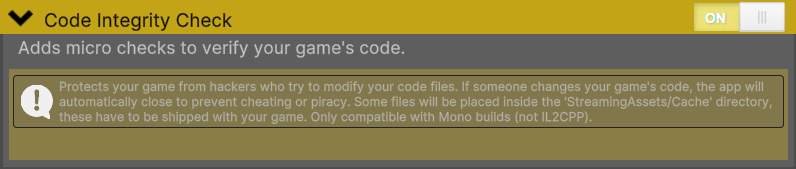 Figure 5 - Check whether the built code was changed.
How it works
- Creates SHA256 fingerprints for built assemblies.
- Stores encrypted check data in
StreamingAssets/Cache/. - Adds small runtime checks that run before your game code starts.
- Closes the game if a check fails.
What you must ship
The StreamingAssets/Cache/ files are required. Do not delete them from the final build. If they are missing, the game may not start.
Platform Support
- Mono Support: ✅ Full support
- IL2CPP Support: ✅ Full support
- Standalone Support: ✅ Windows, Linux, and macOS standalone builds
- Mobile Support: ❌ Not supported
- WebGL Support: ❌ Not supported
- Console Support: ❌ Not supported
Important Notes: Test the final build from the same folder layout you plan to ship. A failed integrity check closes the application without a recovery screen.
Sign Assembly - Settings
Sign Assembly gives compiled .dll files a strong-name signature. This helps show that the assembly was built with your key and has not been replaced with a different unsigned copy.
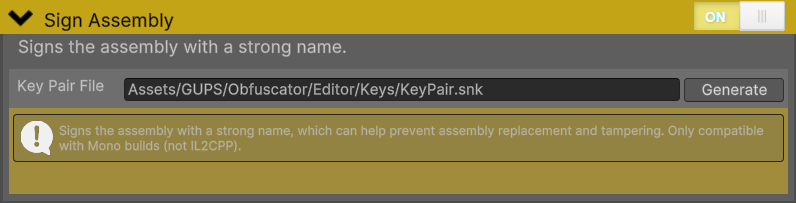 Figure 6 - Sign your assemblies to help detect changed files.
How it works
- Uses an RSA key pair stored in an
.snkfile. - Adds signature data to the assembly.
- Does not change your game logic.
Generate a key pair
- Enable Sign Assembly.
- Click Generate next to Key Pair File.
- Confirm the dialog if you want to create or overwrite the default key.
- The default key path is
Assets/GUPS/Obfuscator/Editor/Keys/KeyPair.snk. - Back up this key file in a safe private location.
Warning
Keep the key file. If you lose it, future updates may not be signed with the same identity as older builds.
Platform Support
- Mono Support: ✅ Full support
- IL2CPP Support: ❌ Not supported
- Standalone Support: ✅ Mono builds only
- Mobile Support: ✅ Mono builds only
- WebGL Support: ✅ Mono builds only
- Console Support: ✅ Mono builds only
Important Notes: Sign Assembly is only compatible with the Mono scripting backend.